Ask naturally
Request technical analysis or an existing-order evaluation without switching to a command console.

MCP PARENT AGENT · WEALTH DASHBOARD
Bring Wealth Dashboard’s Parent Agent into a ChatGPT conversation through a private plugin, or use the native Android app. Ask market questions, review existing orders, and revisit the reports and charts behind each answer.
Public results remain viewable when the local analysis computer is off.
WEALTH DASHBOARD × CHATGPT
Our private WealthDashboard Parent Agent plugin connects ChatGPT to the analysis service. Select the plugin, ask a question in everyday language, and receive the agent’s results in the same chat.
Request technical analysis or an existing-order evaluation without switching to a command console.
Read indicator values, dated results, and returned charts alongside the original request. Ask follow-up questions in context.
ChatGPT calls the specialist service through MCP. The Parent Agent supplies the stored market data and analysis workflow.
“Show me IONQ technical analysis” returned the daily trend, momentum indicators, and support and resistance candidates, with the quote and daily-bar dates distinguished.
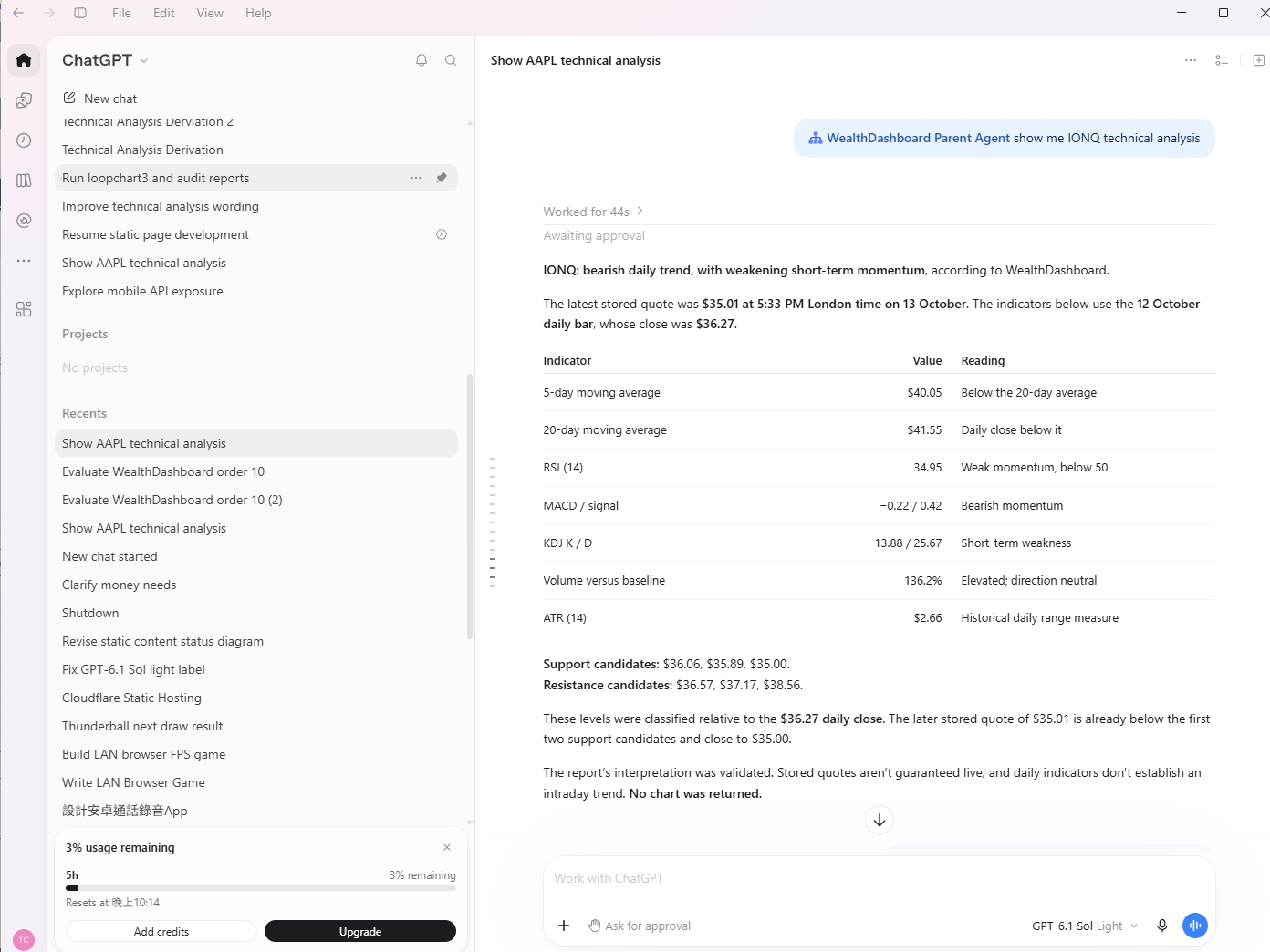
User-supplied screenshot · 13 October 2026 · Historical example; stored quotes are not guaranteed live. No chart was returned for this request.
“Evaluate order 11” returned the HSBC review: completed 1- and 5-session outcomes, their price ranges and signal labels, and a technical chart. The 20-session horizon remains clearly marked pending.
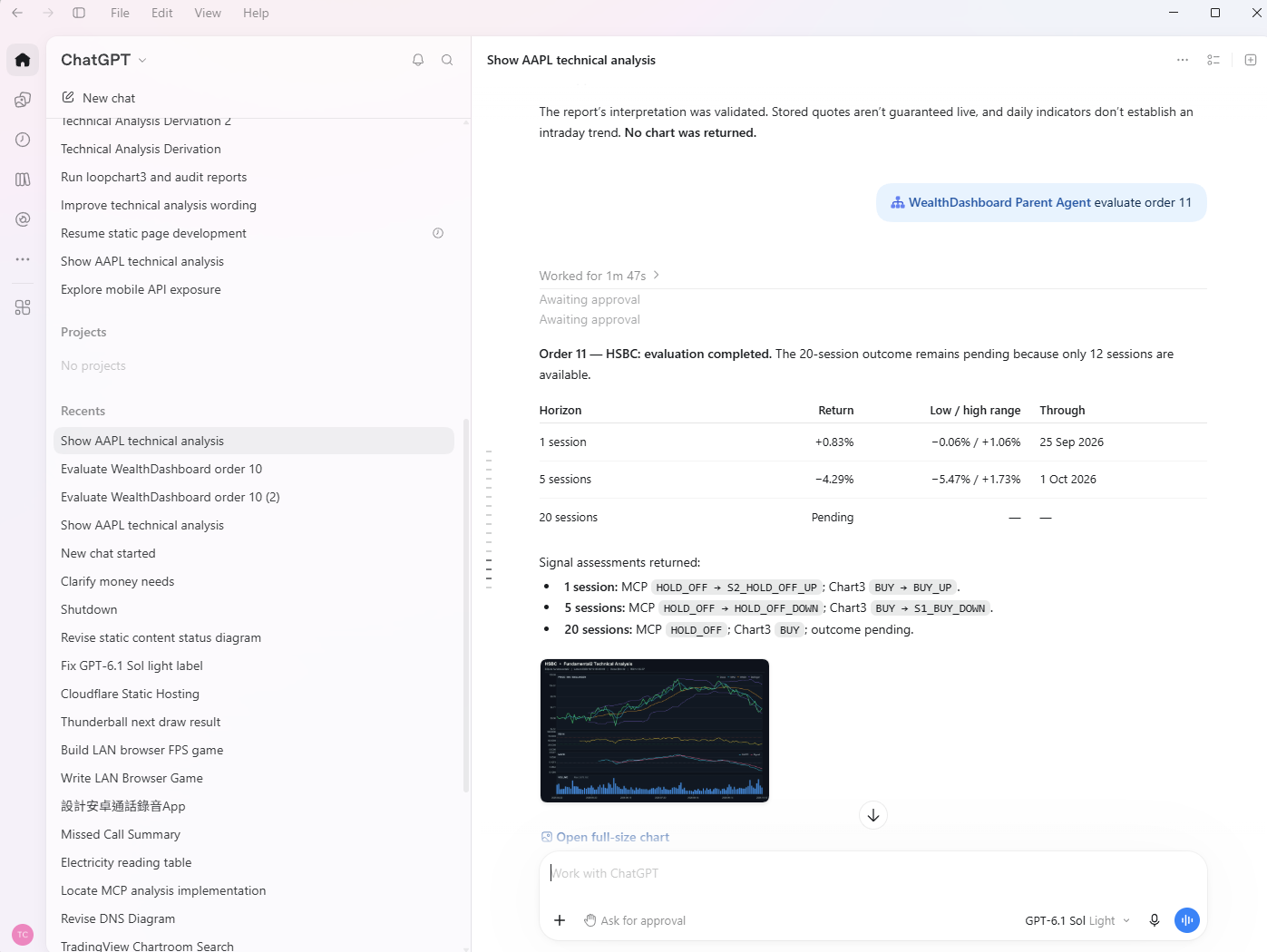
User-supplied screenshot · 13 October 2026 · Evaluation saves review records; this plugin does not place trades. Historical approval labels are visible in the capture.
These examples show our installed plugin in use. Access requires an authorized connection, the local Parent Agent service, and its adapter and tunnel. Availability and approval prompts depend on the host and account. How MCP plugins connect to ChatGPT ↗ · See the ChatGPT request flow →
NATIVE ANDROID · ANALYSIS ON THE GO
Use the same Parent Agent from your Android device. Ask about technical and quantitative analysis, market news, and existing-order evaluations, then keep earlier requests, responses, and returned charts available in History.
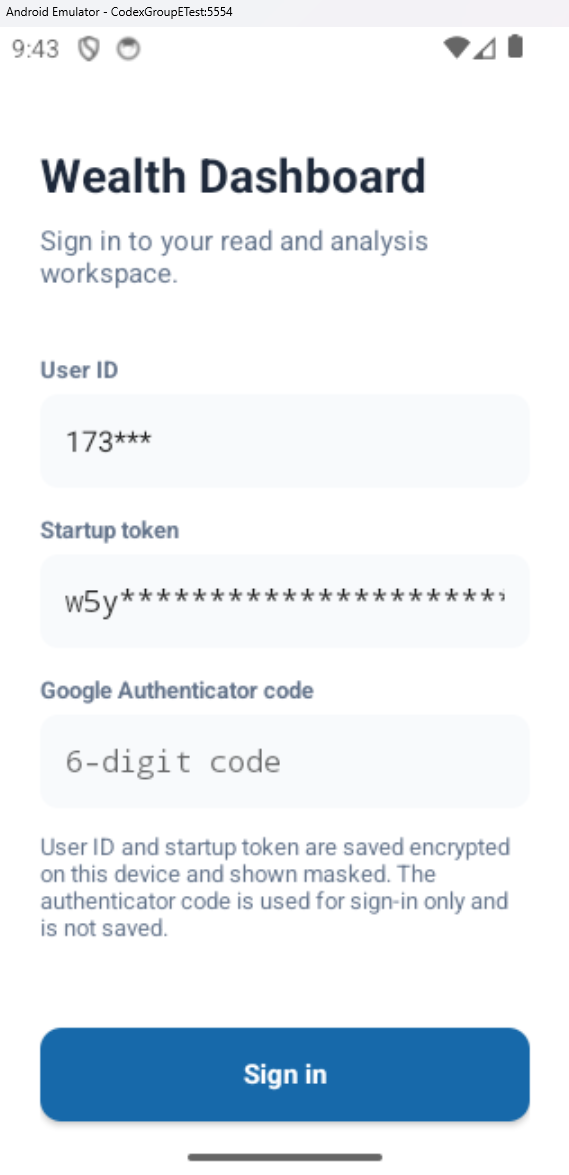
Sign in with your user ID, startup token, and Google Authenticator code. Saved ID and token values are encrypted on the device and displayed masked; the authenticator code is used for sign-in and is not saved.
Open full screenshot ↗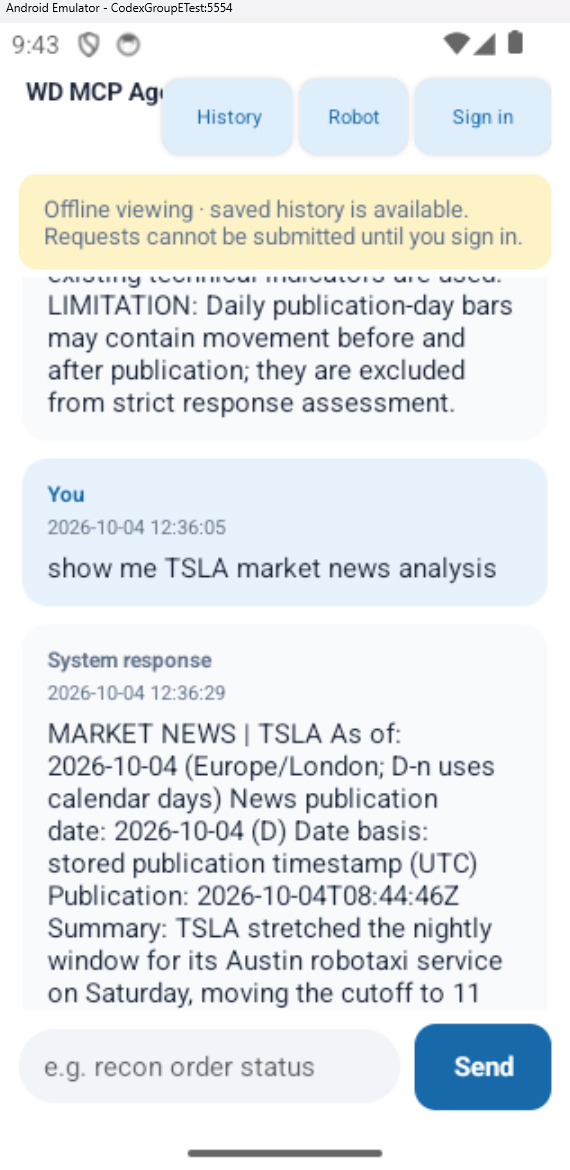
Read earlier conversations when signed out or when the service is unavailable. The offline banner makes the state clear: new requests cannot be submitted until you sign in and the service is reachable.
Open full screenshot ↗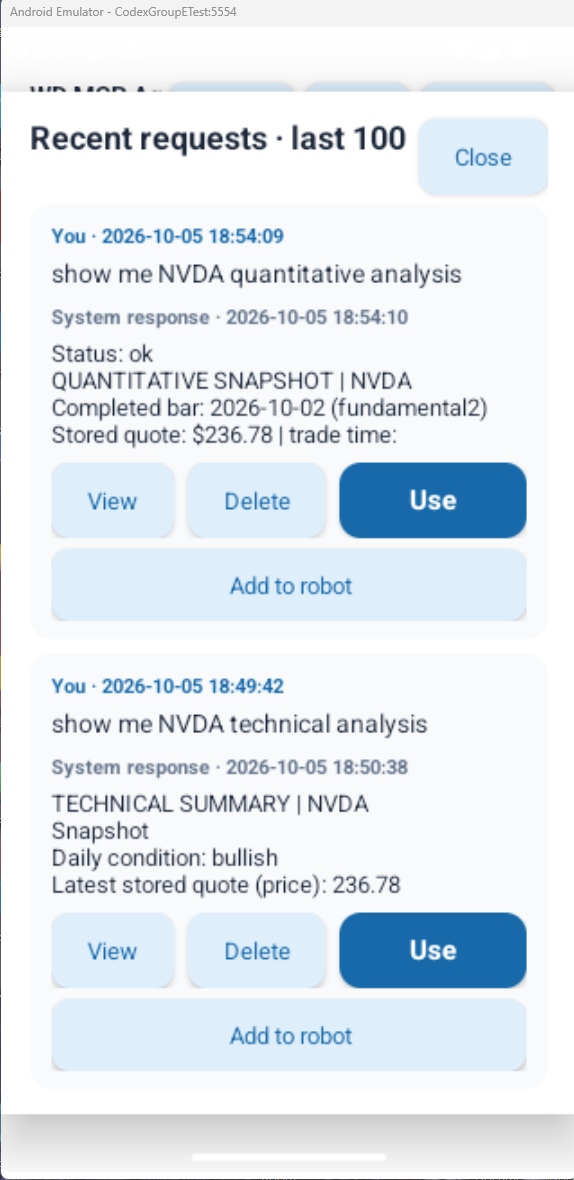
Browse up to 100 saved exchanges. View a response and its saved charts, reuse its request with Use, remove an entry with Delete, or copy it to the Robot queue with Add to robot.
Open full screenshot ↗Reuse a previous question instead of typing it again. The Robot queue lets you select saved requests and run them in sequence; it does not automatically continue in the background after you leave the app.
History retains request and response timestamps plus returned charts. Tap a chart to open a full-screen viewer with zoom and pan.
Saved history remains on the device after sign-out and app close. It is not sent to the service unless a request is submitted again. Uninstalling the app or clearing its data removes the saved files.
Actual user-supplied Android emulator screenshots. The visible market results are historical examples, not live prices. New analysis requires the local Parent Agent, API, and tunnel to be online. See the Android request flow →
HOW IT WORKS
The Parent Agent runs analysis on the local PC. ChatGPT reaches it through an authenticated MCP plugin; Android uses the private Parent API. The local console runs directly on your PC; ChatGPT and Android need the local services and tunnel online for new requests. Published test evidence is served independently.
Install and run the Parent Agent, Ollama model, SQLite MCP server and stored data on your PC. Use the local console for analysis and existing-order evaluation. Fresh market or broker data may still require internet access.
The private plugin and Android app reach the service through the configured Cloudflare Tunnel and authenticated routes. This route depends on the local PC being online.
A separate publish job checks captured output and chart files, then deploys static results to Cloudflare Pages.
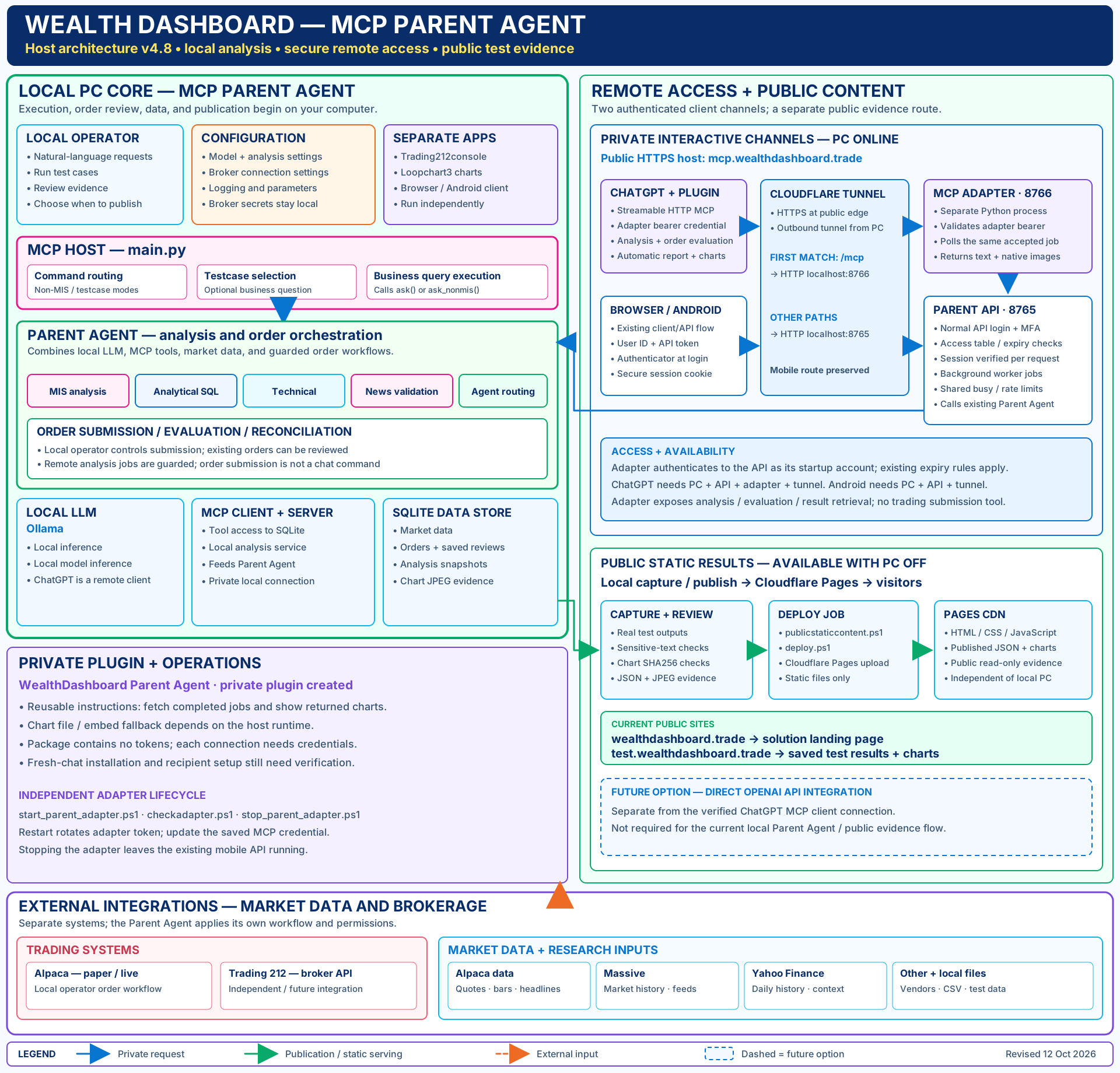
SOLUTION ARCHITECTURE
The diagram shows local Parent Agent analysis, authenticated browser and Android access, the ChatGPT MCP adapter and private plugin, and the separate public evidence route. Dashed boxes identify future options.
REQUEST FLOWS
See how sign-in, authenticated requests, local analysis, and returned reports connect. Choose local PC, ChatGPT plugin, browser OAuth, Android QR approval, or Android analysis access. The OAuth flow also includes module-level diagrams for sign-in and analysis execution.
Follow the local console through the Parent Agent, Ollama model and SQLite MCP server to local reports and charts.
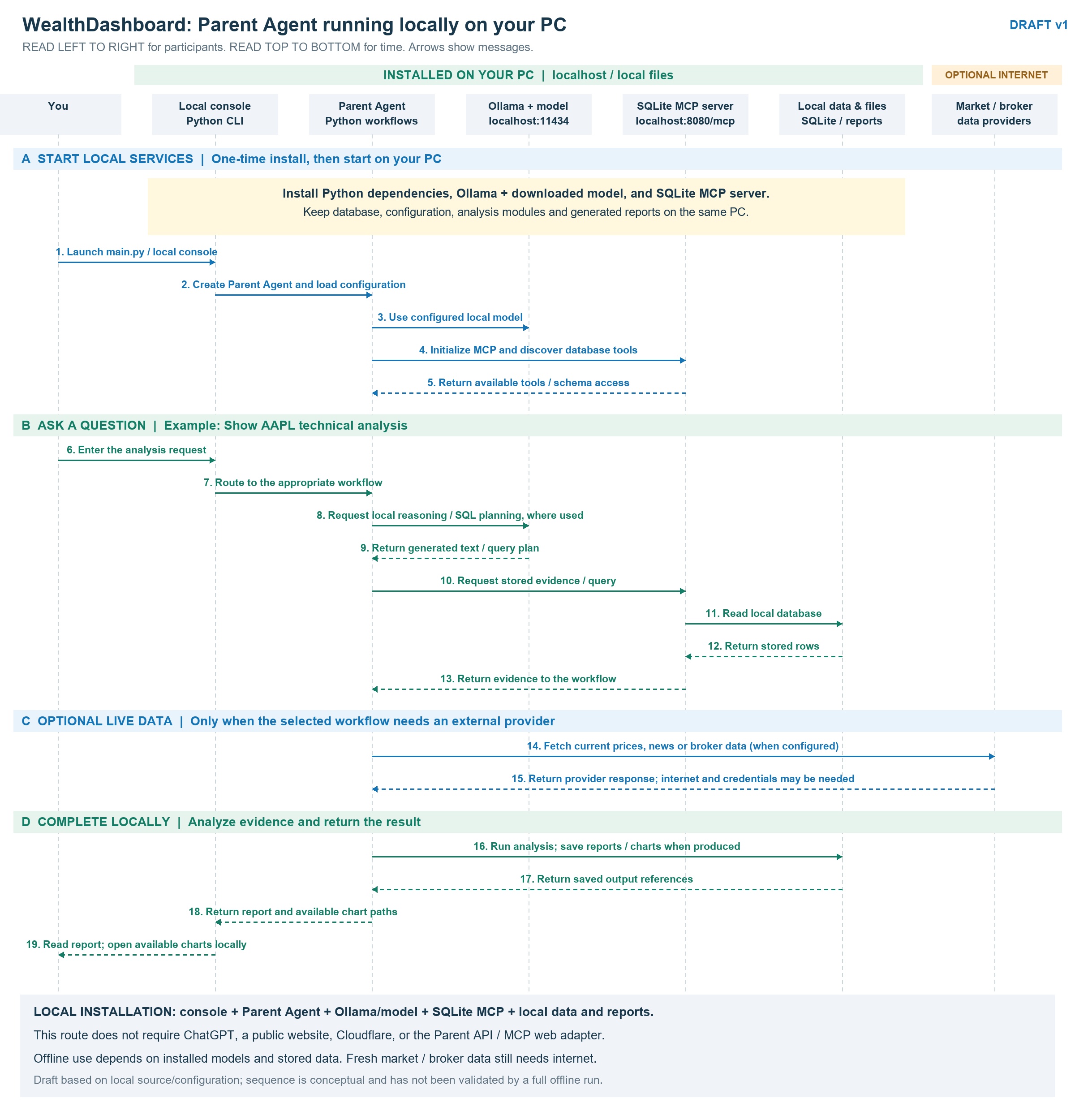
Local installation option. Offline analysis depends on installed models and stored data; fresh market and broker data require external services. The diagram is a design draft, not a verified offline installation.
Follow the original manually configured bearer connection through MCP initialization, tool discovery and analysis. Select OAuth for the newer browser sign-in flow.
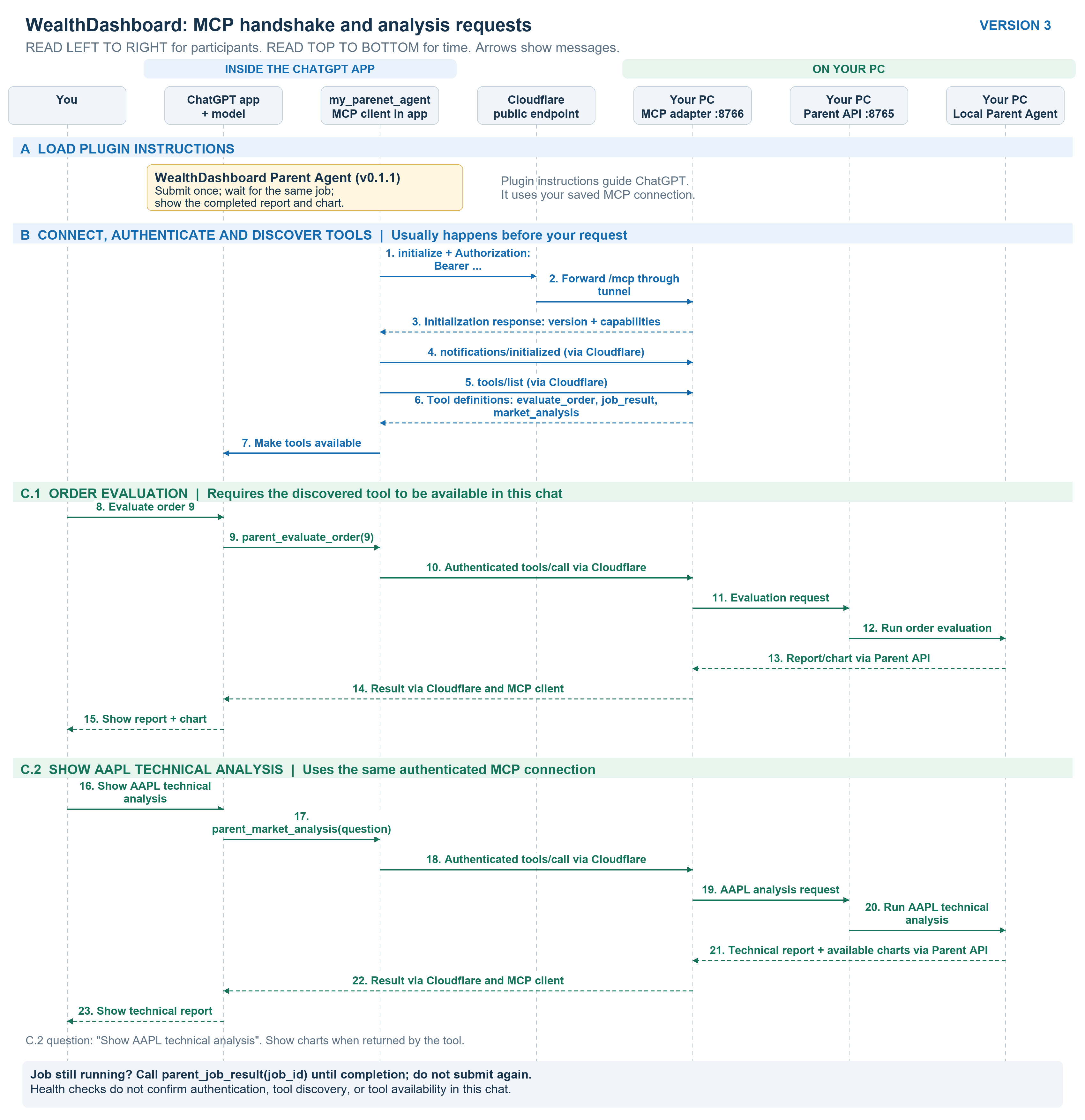
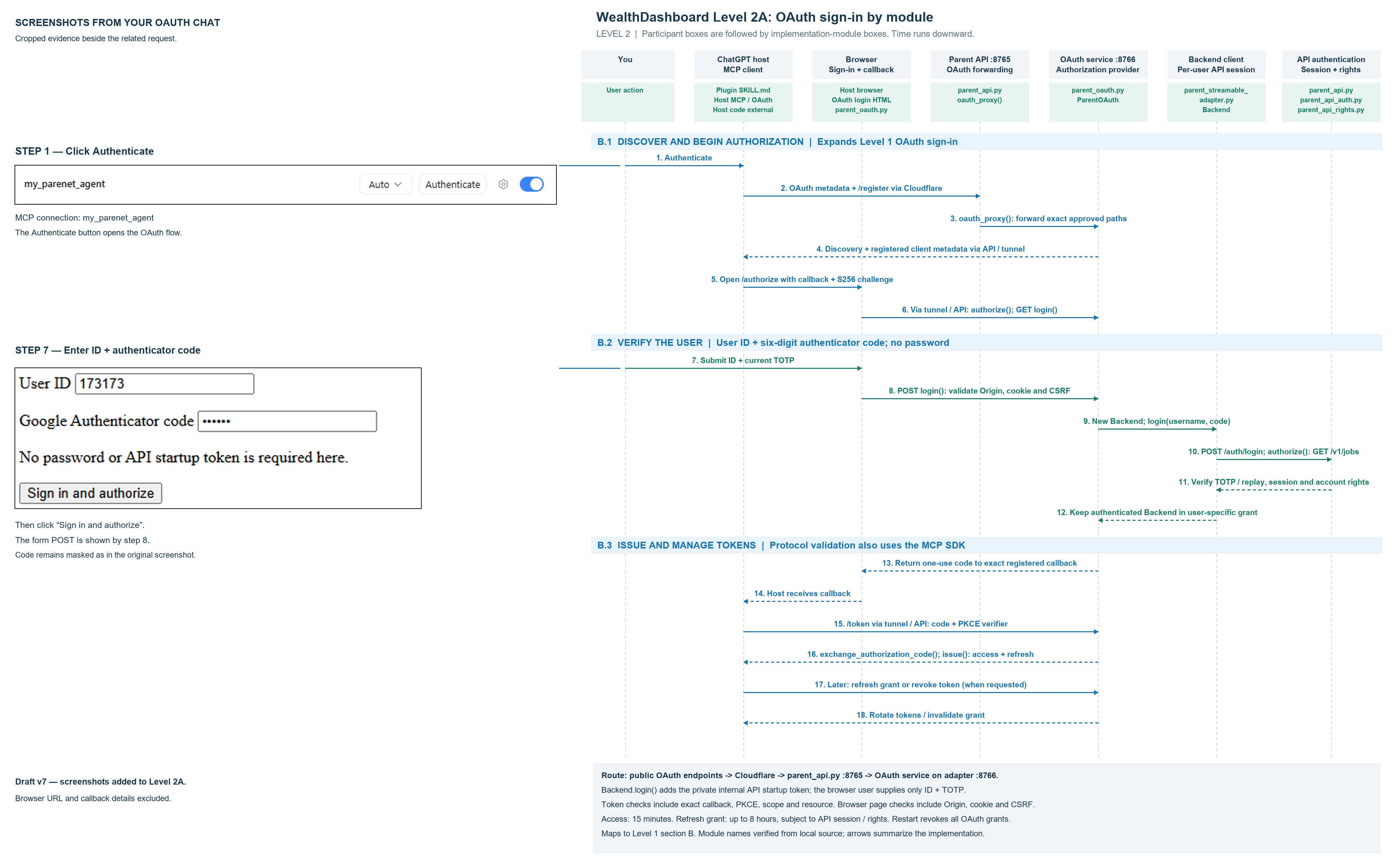
Authenticate with your user ID and current Google Authenticator code, then follow MCP discovery and a single analysis call to your local PC.
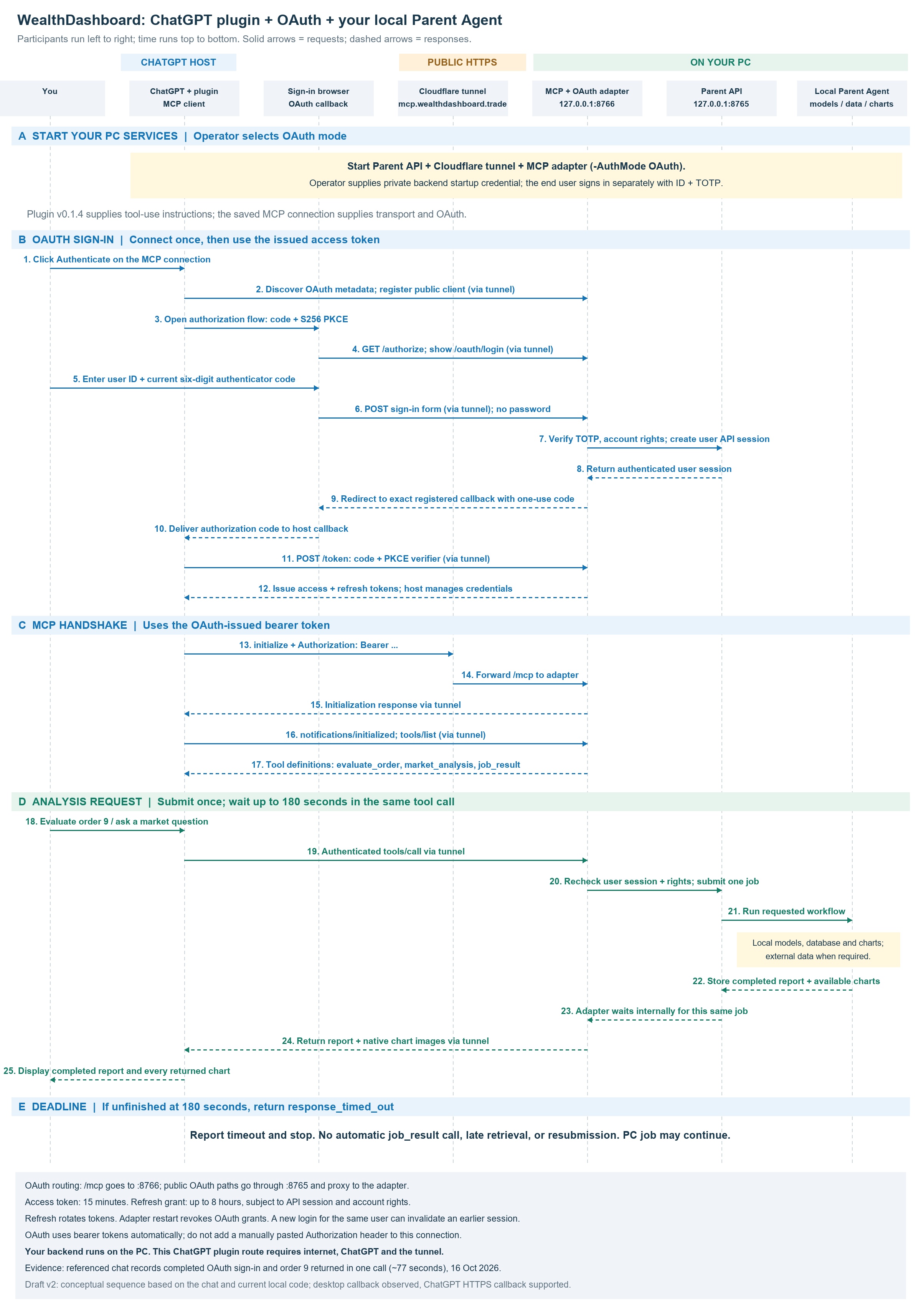
No password or manually pasted bearer header is needed for this OAuth connection. ChatGPT, internet access and the tunnel remain required. The adapter waits up to 180 seconds in the original call; on timeout, it stops returning results automatically while the PC job may continue.
Authenticate-button and sign-in screenshots beside the request arrows; module names beneath each participant.
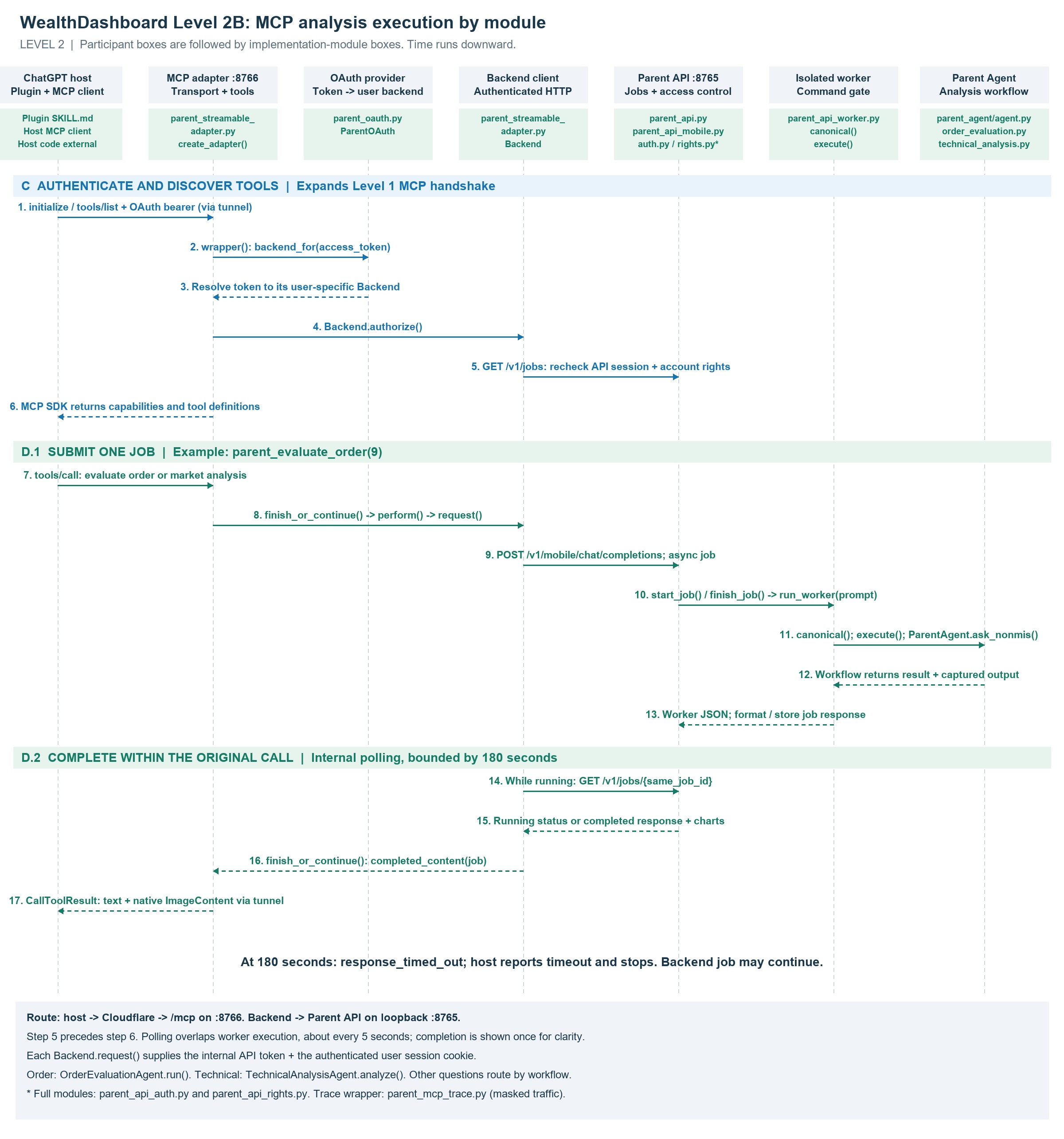
Follow token validation, per-user API access, worker execution and internal job checks within the original tool call.
Start Authenticate in ChatGPT on your PC. Enter your user ID and choose “Show QR for Android authorization”. In Wealth Dashboard Android 1.1, open “Authorize ChatGPT” and scan the QR. Compare the confirmation number on both screens, then enter a fresh six-digit Google Authenticator code on the phone and approve. The desktop browser continues the OAuth flow automatically.
The page identifies the account and requesting client, displays a confirmation number to compare with Android, and waits for phone approval.
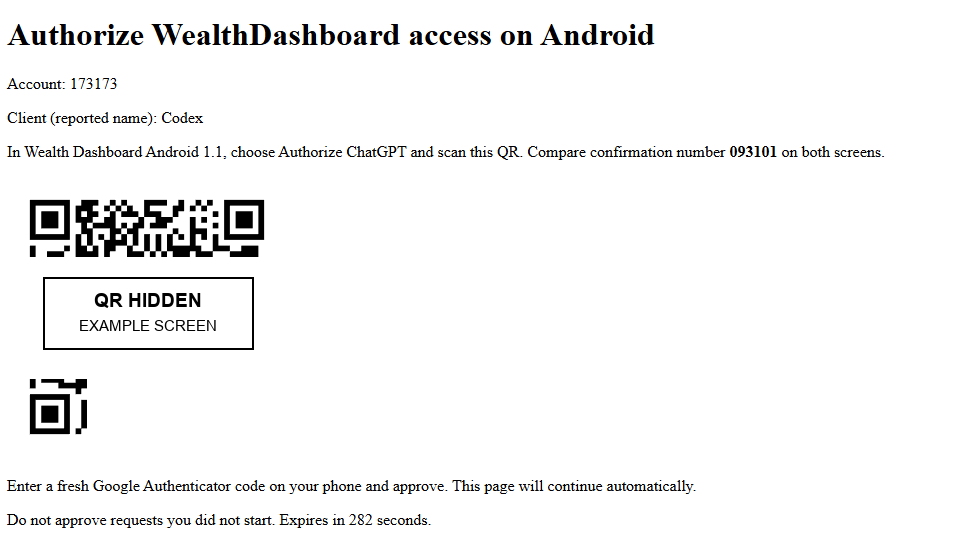
Example screen from the authorization flow. The browser address and QR request data are excluded from this public copy. Start a fresh request in ChatGPT to display your own QR. Compare the confirmation number, then enter a fresh Google Authenticator code on Android and approve.
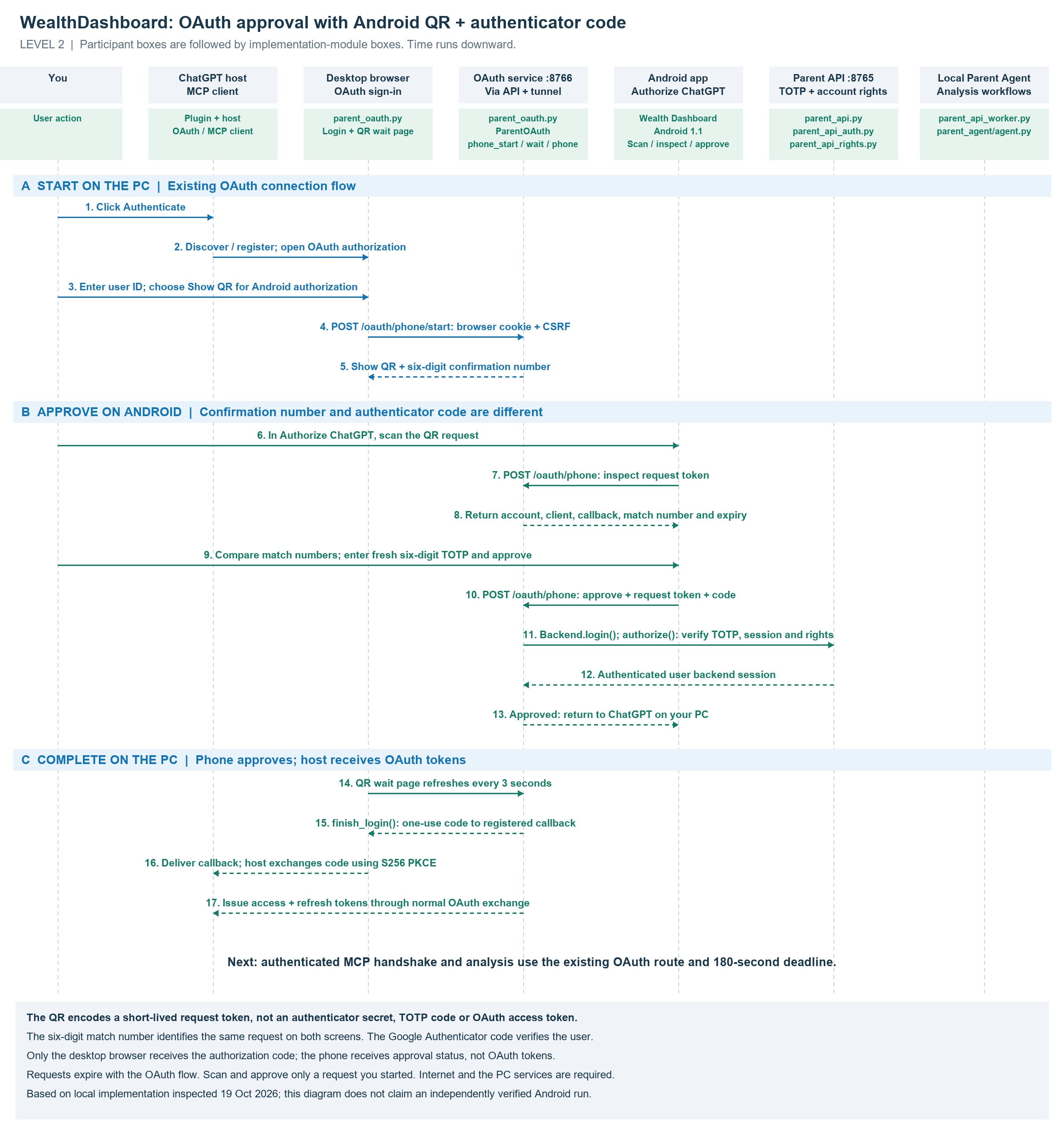
The confirmation number and authenticator code have different roles: compare the displayed number, then type the fresh code from Google Authenticator. The QR contains a short-lived request reference, not an authenticator enrollment secret. OAuth tokens go to the desktop host. This option requires the supporting Android app, internet access, and the PC services online.
See the shared OAuth handshake and analysis diagrams ↗Follow the mobile-to-API route through the tunnel and local Parent Agent, including the optional background-job path.
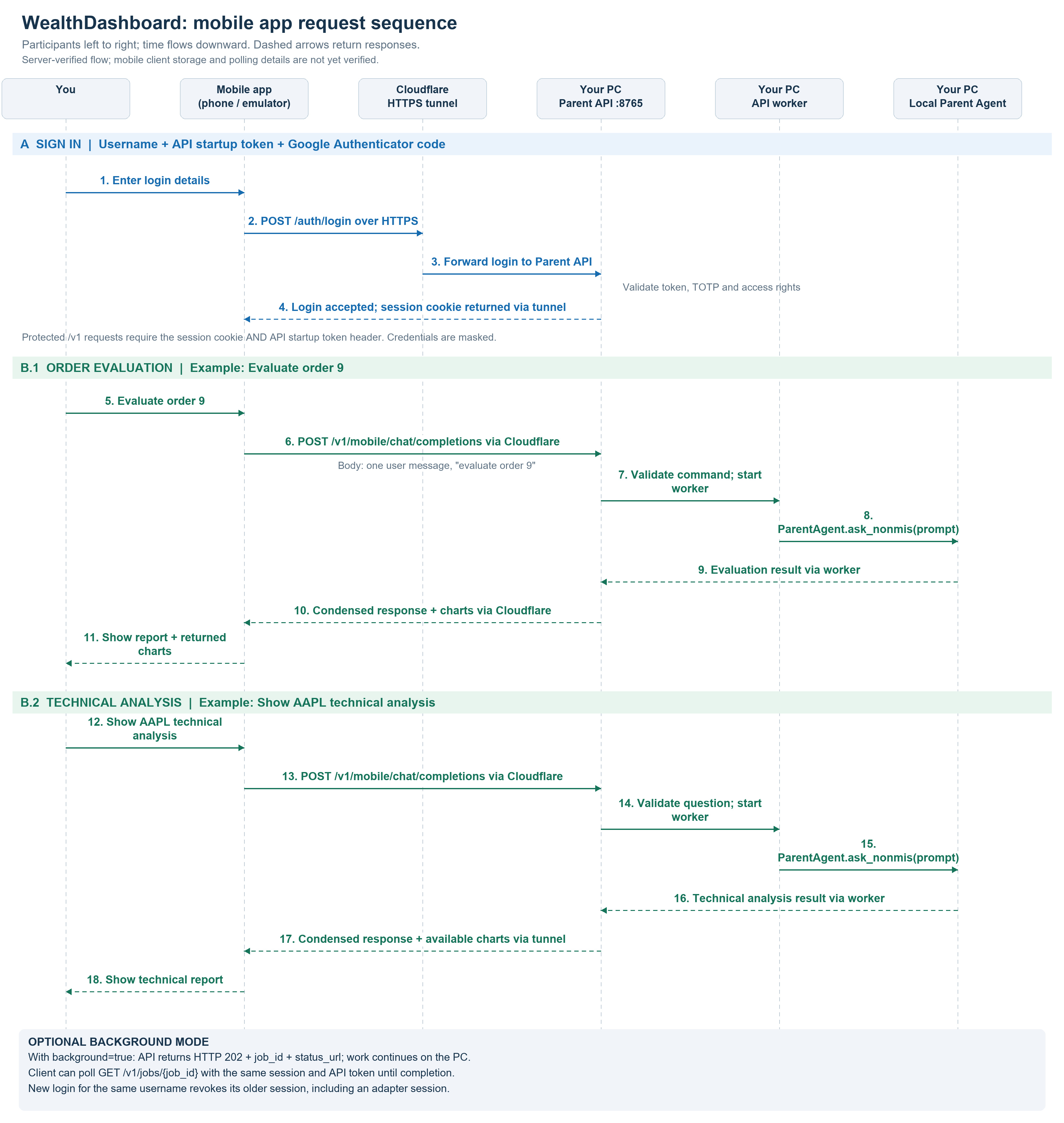
Based on the current server implementation. Mobile client storage and polling behavior have not yet been independently verified.
Sequence diagrams describe request paths; they are not live service-status indicators. Open the JPEG to zoom and inspect the labels.
OAUTH IMPLEMENTATION
OAuth connects the ChatGPT plugin to the Parent Agent on your PC. Use the browser-code form or Android QR approval. Both lead to the same OAuth token exchange and authenticated analysis route. These programs handle authorization, user sessions, request routing and diagnostics.
Explore the OAuth sequence diagrams ↗| Program | Objective | OAuth-related changes |
|---|---|---|
parent_oauth.py | OAuth authorization service | Provides discovery, client registration, authorization, token exchange, refresh and revocation. Sign in with user ID and Google Authenticator code, without a password. Validates callbacks, PKCE, browser cookies and CSRF, with the browser Origin and callback-policy fixes. Also implements QR request creation, phone inspection and TOTP approval, and automatic browser completion. |
parent_streamable_adapter.py | MCP requests on port 8766 | Supports Bearer, OAuth and Both modes. Validates OAuth access tokens and selects the authenticated user’s backend session for each request. Adds OAuth challenges and authentication details to health output. Separate budgets keep discovery and QR-page refreshes from consuming the authorization request allowance. |
parent_api.py | Parent API on port 8765 | Forwards only approved OAuth endpoint paths, including the phone-approval routes, to the adapter so the existing tunnel routing works. Reuses authenticator verification, account permissions and backend session checks. |
start_parent_adapter.ps1 | Start and configure the adapter | Adds -AuthMode Bearer|OAuth|Both, defaulting to Bearer. OAuth requires -PublicHost. Users enter their authenticator code in the browser or approve the QR request with a fresh code on Android; the operator still supplies the internal API startup token. |
checkadapter.ps1 | Diagnose service and connection readiness | Displays authentication mode, OAuth issuer and enabled methods. Checks public /mcp routing and OAuth discovery, including issuer/resource matching and PKCE. Discovery success alone does not prove sign-in works. |
parent_mcp_trace.py | Record masked diagnostic traffic | Masks OAuth codes, state, flow identifiers, tokens, cookies and related sensitive fields, including credentials in redirect URLs. |
tests/test_auth_modes.py | Test authentication behavior | Covers mode enforcement, passwordless login, user isolation, callback restrictions, PKCE, replay prevention, expiry, refresh rotation, revocation, API forwarding and browser-page policies. |
tests/run_auth_validation.py | Run combined regression checks | Runs OAuth, MCP adapter and existing API tests with synthetic credentials. The recorded validation after the OAuth traffic-budget correction passed 49 tests on 19 October 2026; this is a historical result, not a live status check. |
ACCESS & ROADMAP
The configured browser and Android route uses mcp.wealthdashboard.trade and requires authentication.
An additional interactive interface is being considered. It is not part of the current public results flow.
PUBLIC EVIDENCE
Search by symbol or order, filter by test date and verdict, and open saved order charts.